
Real Time Data Ingestion + Milliseconds RAG Queries. All in one!
Powered by Redpanda and Clickhouse. Warning! Seriously Production Grade!!!

TL;DR
I have used Redpanda to ingest data into Clickhouse and created vector embeddings. The point of this post is to focus on PRODUCTION grade systems, rather than creating colabs, on POC level data and achieve nothing!
The dataset used in this post is from Kaggle (Amazon Sales Dataset)
About the dataset
This dataset is having the data of 1K+ Amazon Product's Ratings and Reviews as per their details listed on the official website of Amazon.
Features
product_id - Product ID
product_name - Name of the Product
category - Category of the Product
discounted_price - Discounted Price of the Product
actual_price - Actual Price of the Product
discount_percentage - Percentage of Discount for the Product
rating - Rating of the Product
rating_count - Number of people who voted for the Amazon rating
about_product - Description about the Product
user_id - ID of the user who wrote review for the Product
user_name - Name of the user who wrote review for the Product
review_id - ID of the user review
review_title - Short review
review_content - Long review
img_link - Image Link of the Product
product_link - Official Website Link of the Product
Now enough about the dataset, lets talk production now!
What is Redpanda?
Redpanda is the most complete, Apache Kafka®-compatible streaming data platform, designed from the ground up to be lighter, faster, and simpler to operate. Free from ZooKeeper™ and JVMs, it prioritizes an end-to-end developer experience with a huge ecosystem of connectors, configurable tiered storage, and more.
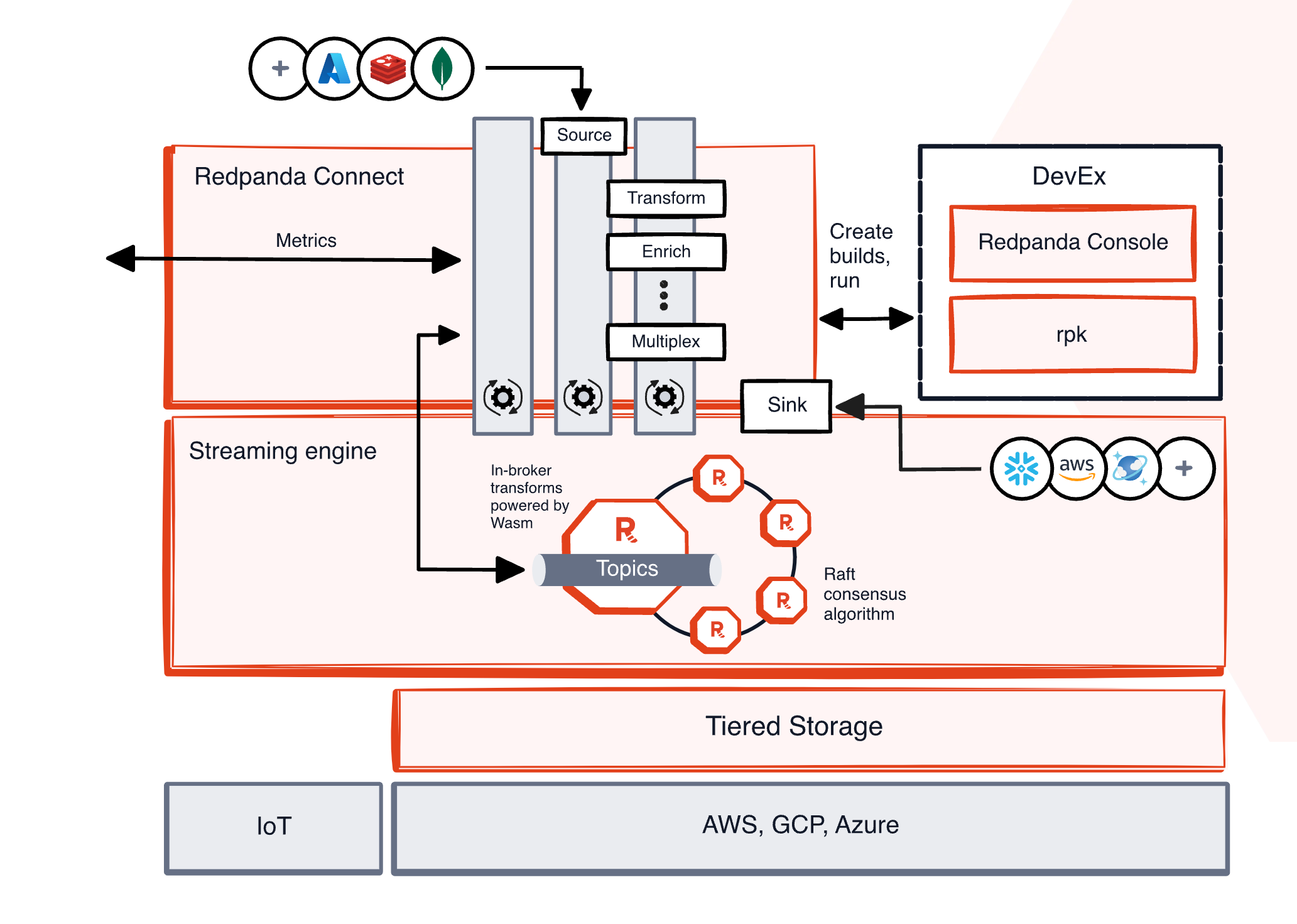
Features of Redpanda
Simple:
Single binary with built-in schema registry, HTTP proxy, and message broker.
Easy deployment and scaling in self-managed environments.
Kafka API-compatible:
Seamless migration from Kafka without application code changes.
Access to the entire Kafka ecosystem.
Redpanda Console:
Easy-to-use web UI for data stream visibility.
Powerful features for time travel debugging and cluster administration.
Local dev, CI/CD:
Fast deployment (minutes) and spin-up (seconds).
Runs efficiently on various platforms: containers, laptops, x86/ARM hardware, edge, cloud.
Developer-first CLI (RPK):
Single tool for managing the entire Redpanda cluster.
Handles low-level tuning, node configuration, and tasks like topic creation.
No ZooKeeper/KRaft, No JVM:
No external dependencies for easier deployments.
Simplifies Kubernetes and edge computing deployments.
Eliminates JVM tuning.
Deploys anywhere:
Runs in any environment: cloud, private cloud, bare metal, edge.
Supports existing identity and access management.
Inline data transforms:
Built-in transforms for data enrichment and business logic.
Reduces reliance on additional processing infrastructure.
Redpanda Connect:
280+ pre-built connectors for data integration.
Free to use, with paid plans for support and enterprise features.
Powerful:
GB/s+ throughput with a small footprint.
Up to 10x lower tail latencies (compared to Kafka).
6x faster transactions.
Optional write caching for reduced latencies.
Predictable p99 latencies.
Automatic hardware tuning.
Cost Effective:
Up to 6x lower total costs.
Intelligent tiered storage with cloud object stores.
Remote Read Replicas for efficient data serving.
Follower fetching to reduce network costs.
Serves as a single "engine of record."
Lightweight connectors (3x less compute, 128 MiB binary).
Mission Critical:
No data loss (Raft-based).
Petabyte scale.
Continuous cluster balancing.
Enterprise security (encryption, Kerberos, ACLs, IAM, SSO, RBAC).
Multi-AZ support.
Native Prometheus integration with Grafana dashboards.
Scalable cluster operations (maintenance mode, diagnostics, upgrades).
How Redpanda is different from Apache Kafka?
Read the complete ebook
What is Clickhouse?
ClickHouse® is a high-performance, column-oriented SQL database management system (DBMS) for online analytical processing (OLAP). It is available as both an open-source software and a cloud offering.
Row-oriented vs. column-oriented storage
Such a level of performance can only be achieved with the right data "orientation".
Databases store data either row-oriented or column-oriented.
In a row-oriented database, consecutive table rows are sequentially stored one after the other. This layout allows to retrieve rows quickly as the column values of each row are stored together.
ClickHouse is a column-oriented databases. In such systems, tables are stored as a collection of columns, i.e. the values of each column are stored sequentially one after the other. This layout makes it harder to restore single rows (as there are now gaps between the row values) but column operations such as filters or aggregation becomes much faster than in a row-oriented database.
Row-oriented DBMS
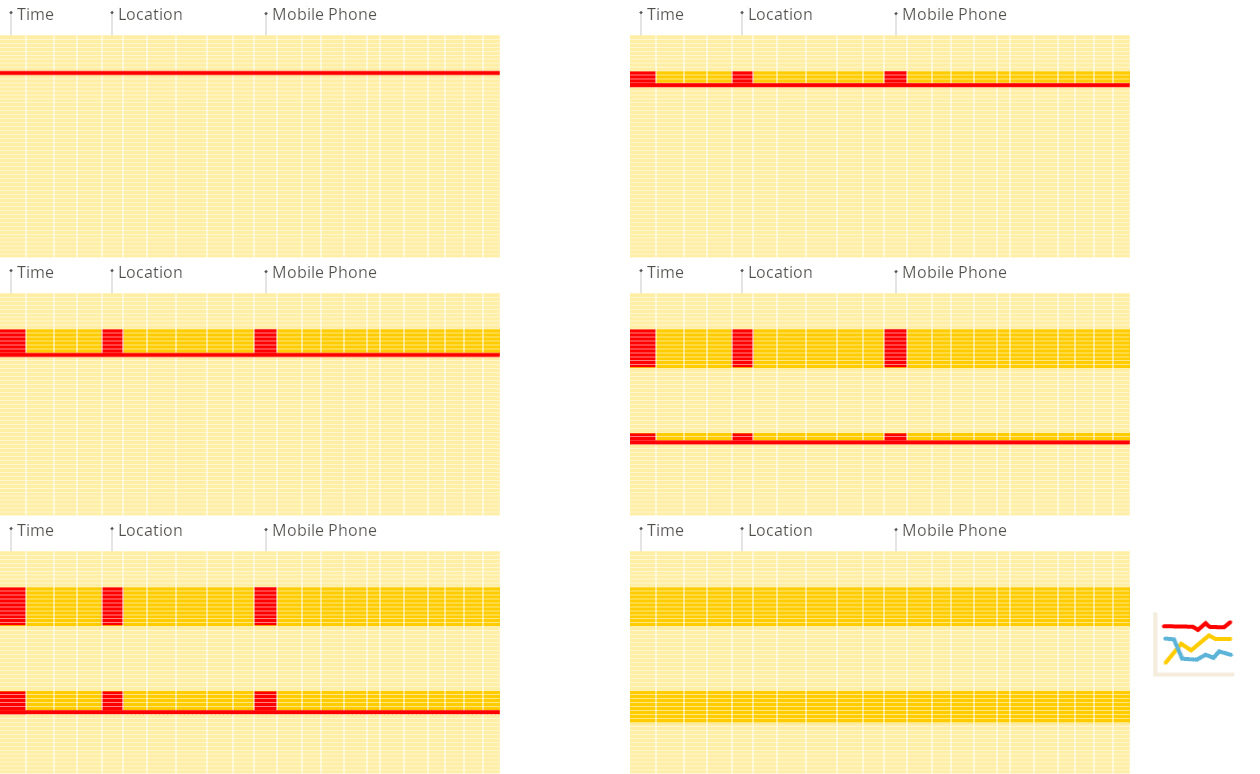
In a row-oriented database, even though the query above only processes a few out of the existing columns, the system still needs to load the data from other existing columns from disk to memory. The reason for that is that data is stored on disk in chunks called blocks (usually fixed sizes, e.g., 4 KB or 8 KB). Blocks are the smallest units of data read from disk to memory. When an application or database requests data, the operating system’s disk I/O subsystem reads the required blocks from the disk. Even if only part of a block is needed, the entire block is read into memory (this is due to disk and file system design):
Column-oriented DBMS
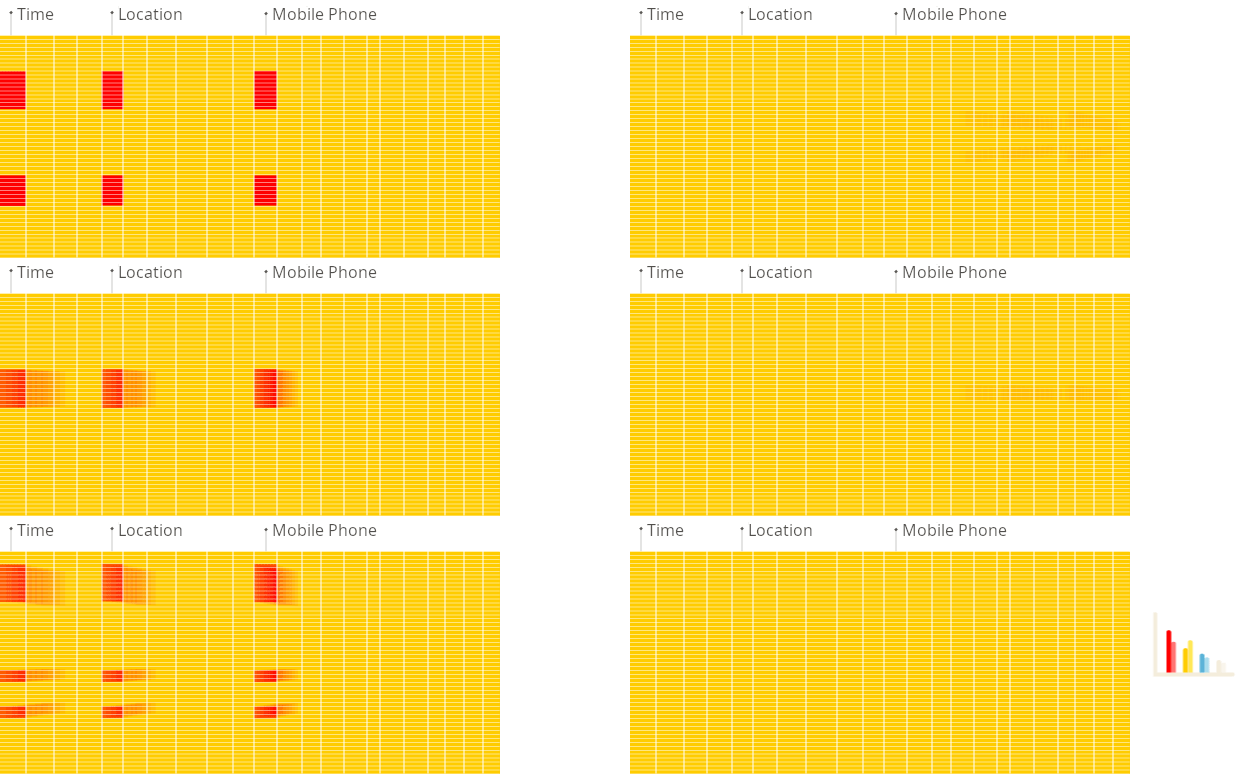
Because the values of each column are stored sequentially one after the other on disk, no unnecessary data is loaded when the query from above is run. Because the block-wise storage and transfer from disk to memory is aligned with the data access pattern of analytical queries, only the columns required for a query are read from disk, avoiding unnecessary I/O for unused data. This is much faster compared to row-based storage, where entire rows (including irrelevant columns) are read:
What problem we are going to solve?
We will be working on problem which comes directly from Redpanda use cases.
Real-time product recommendation AI inferencing
Full Codebase: GitHub
Here's an outline of what we want our pipeline to do:
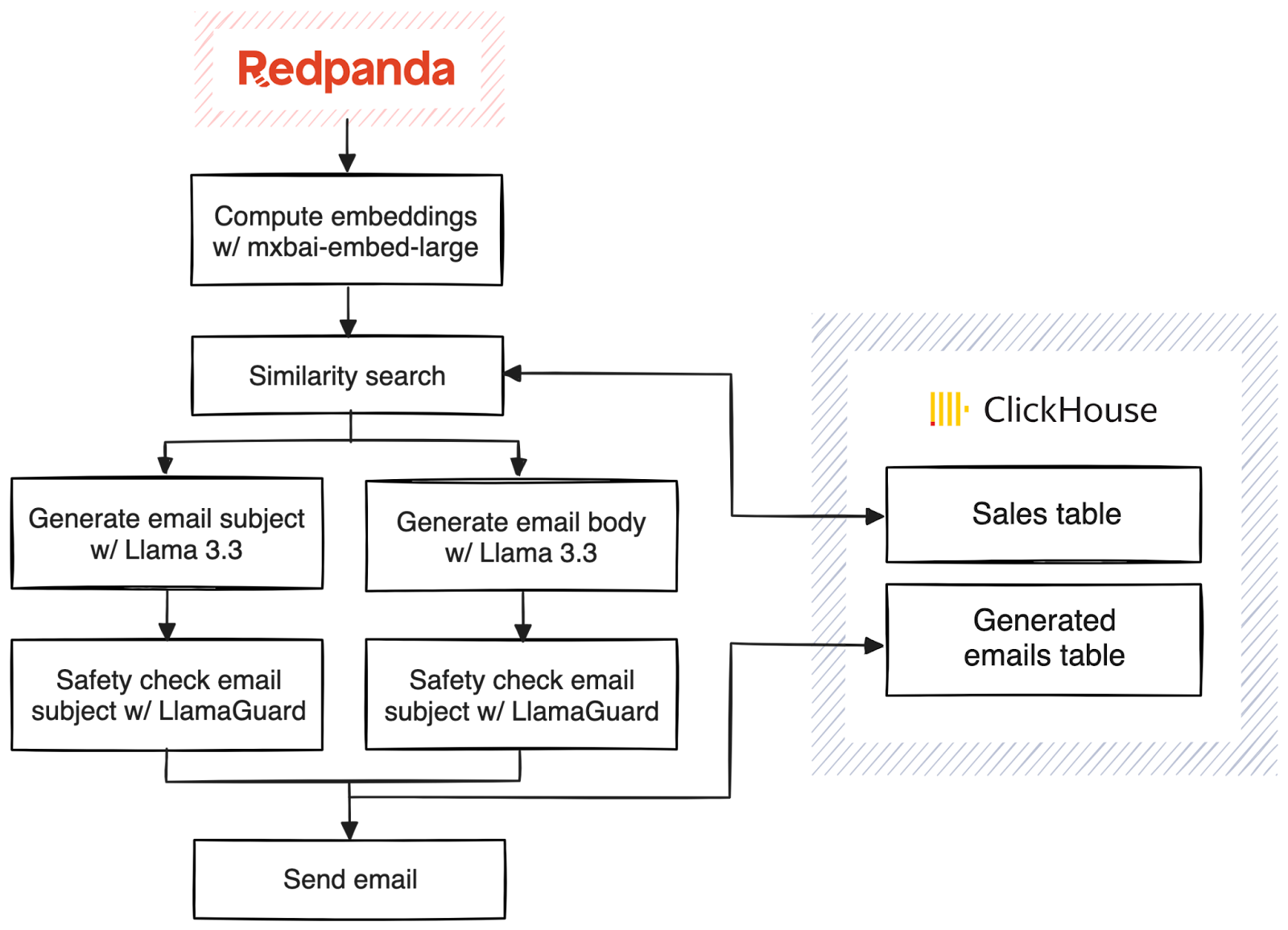
What different I have done in the above architecture?
I have added a RAG search also, which queries the data ingested into clickhouse via natural language queries
Pre-requisites:
Create a trial cluster on Redpanda Cloud: To do this you need to follow the steps mentioned in Redpanda Cloud API Quickstart. You can also create a cluster directly from UI on the this link.
Also, obtain Redpanda Enterprise key from the from this official link. Its a 30 day FREE trial, hence it will be enough for you.
Start a Clickhouse Docker Instance: Run the below command in Terminal
docker run -d --name clickhouse-server -p 8123:8123 -p 9000:9000 clickhouse/clickhouse-server
Check if Clickhouse is running properly by the below command:
docker ps | grep clickhouse
Obtain MailSlurp API Key: Follow the documentation to do this.
Now coming to Ollama: (Run the below commands in a separate terminal)
# Install Ollama if you haven't already curl https://ollama.ai/install.sh | sh
# Start the Ollama service ollama serve
# In another terminal, pull the required models
ollama pull mxbai-embed-large
ollama pull llama3.2
ollama pull llama-guard3
Once the above processed are done, follow my GitHub Repo as below:
Step 1: Repo Link: https://github.com/asadnhasan/redpanda-prod
Step 2: Clone the Repo:
git clone https://github.com/asadnhasan/redpanda-prod.git
Step 3: Go to Folder:
cd redpanda-prod
Step 4: Create a VENV and dont forget to activate it!
Step 5: Install rpk using the command below
brew install redpanda-data/tap/redpanda
Step 6: Login and authenticate to your already made redpanda cluster
rpk cloud login
After selecting your cluster, we need to verify if RPK Connect is properly set up.
rpk connect version
If RPK Connect isn't installed, you'll need to install it:
rpk connect upgrade
Export the full path of your file, which you obtained while creating a trial account for Redpanda Enterprise
REDPANDA_LICENSE_FILEPATH="/full/path/to/your/license.txt"
Once that's done, let's try running your ingest pipeline:
rpk connect run ./configs/ingest.yaml
Once the above data ingestion is done you might get the below messages:
(redpanda-project) (base) kiwitech@KiwiTechs-MacBook-Pro redpanda-project % rpk connect run ./configs/ingest.yaml INFO Running main config from specified file @service=redpanda-connect benthos_version=4.46.0 path=./configs/ingest.yaml INFO Listening for HTTP requests at:
http://0.0.0.0:4195
@service=redpanda-connect INFO Input type file is now active @service=redpanda-connect label="" path=root.input INFO Pulling "mxbai-embed-large" @service=redpanda-connect label="" path=root.pipeline.processors.0.branch.processors.0 INFO Finished pulling "mxbai-embed-large" @service=redpanda-connect label="" path=root.pipeline.processors.0.branch.processors.0 INFO Launching a Redpanda Connect instance, use CTRL+C to close @service=redpanda-connect INFO Output type sql_insert is now active @service=redpanda-connect label="" path=root.output
Run Natural Language Search with the below Command:
SEARCH_QUERY="looking for a gaming phone under 15000" rpk connect run ./configs/enhanced_search.yaml
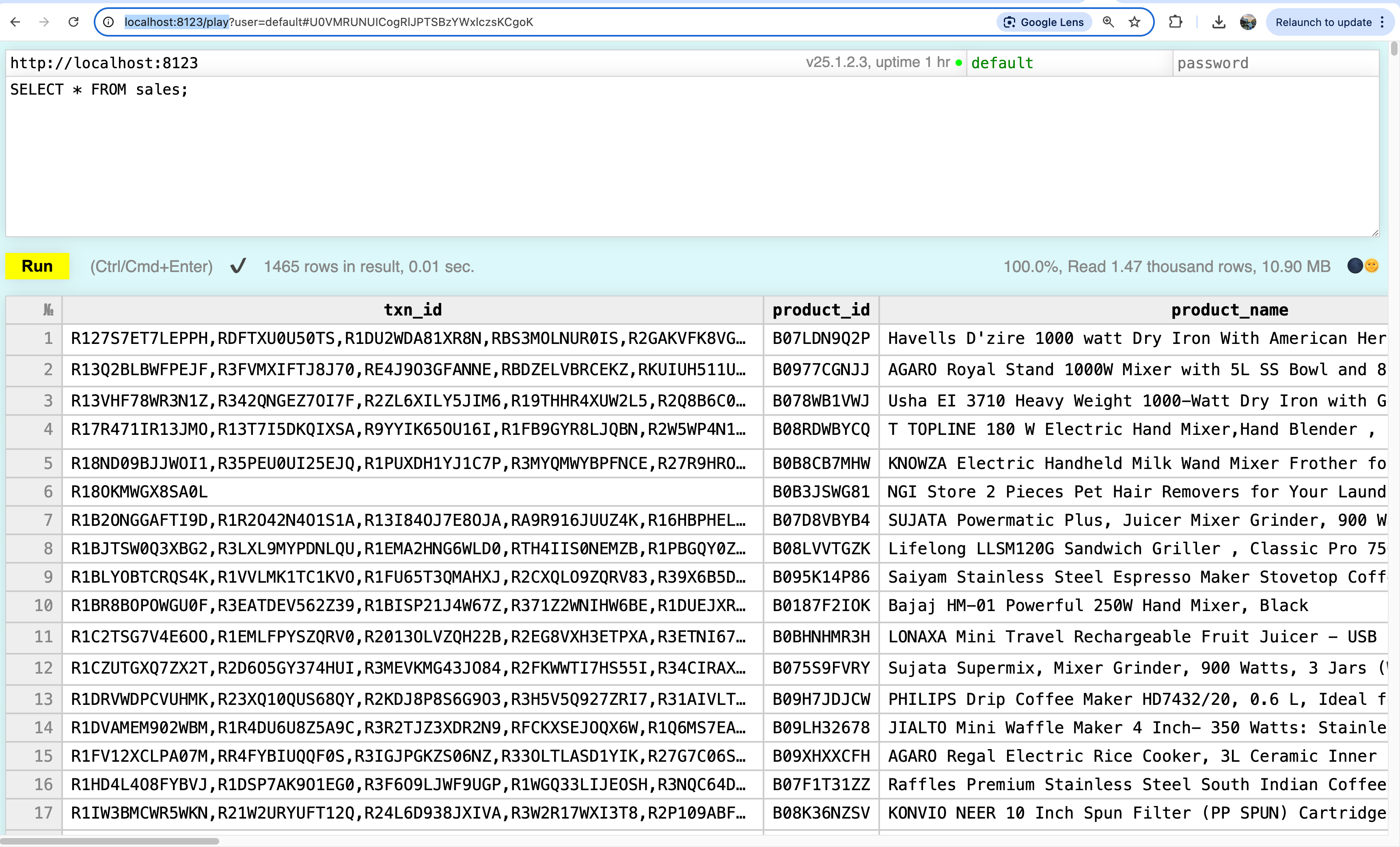
You can also run SQL Commands/queries mentioned in my GitHub README.md. Also, you can use Clickhouse Play UI on the link: http://localhost:8123/play
The UI looks like below:
Enjoy the Power of RealTime Streaming + Real Time Warehousing!!!!
Initial adaptation from: Original Article at Redpanda Blogs